
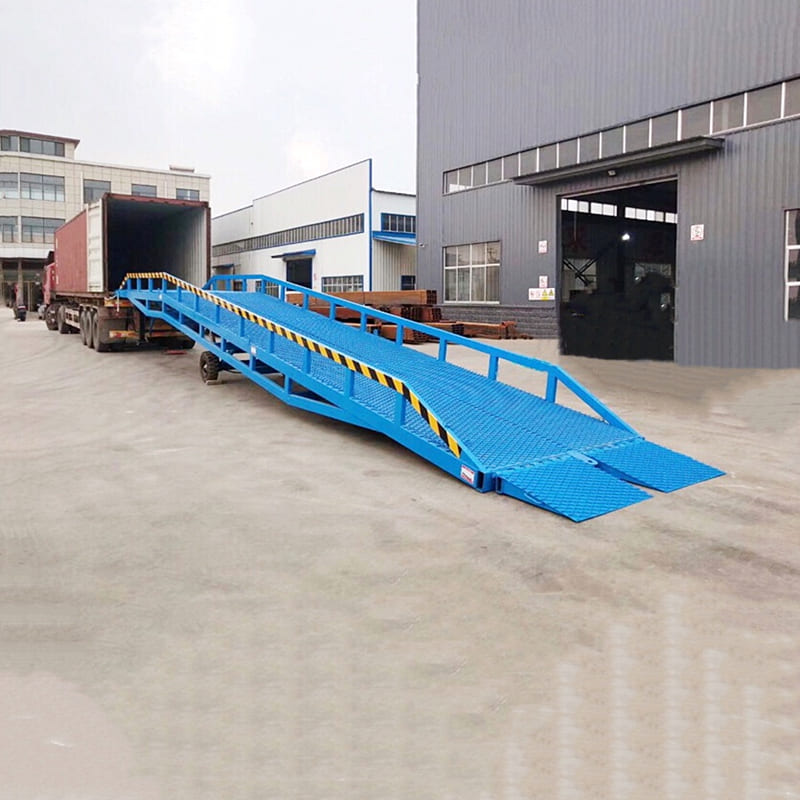
How to Use a Mobile Boarding Bridge and Loading Platform
How to Use a Mobile Boarding Bridge and Loading Platform
1. Preparation and Positioning:
- Flip the Platform: Raise the platform end of the bridge.
- Attach Forklift: Use a forklift to lift the bridge end.
- Move the Bridge: Position the bridge near the vehicle for loading/unloading.
- Lower the Platform: Lower the platform end to ground level.
2. Vehicle Alignment and Bridge Adjustment:
- Open Tailgate: Open the vehicle’s tailgate and secure it.
- Raise the Bridge Lip: Lift the lip of the bridge.
- Position the Vehicle: Reverse the vehicle until it’s about 200mm from the bridge.
- Adjust Bridge Height: Use the handle to adjust the bridge height to match the vehicle’s floor.
- Note: The lifting mechanism has two gears: light gear (slower, less effort) and heavy gear (faster, more effort).
- Lower the Bridge Lip: Lower the lip onto the vehicle’s floor, ensuring at least 200mm of overlap.
3. Securing the Bridge:
- Attach Safety Chains: Secure the safety chains to the vehicle to prevent accidental disengagement.
- Tighten Supporting Screws: Tighten the supporting screws to stabilize the bridge.
4. Loading and Unloading:
- Use Forklift: Use the forklift to load and unload goods onto the bridge and into the vehicle.
5. Post-Operation:
- Release Safety Chains: Loosen the safety chains.
- Raise Bridge Lip: Raise the bridge lip.
- Move the Vehicle: Drive the vehicle away from the bridge.
- Store the Bridge: Retract the bridge, raise the platform, and move it to storage using a forklift.
Key Points to Remember:
- Always ensure the bridge is securely positioned and stabilized.
- Use the appropriate lifting gear for efficient and safe operation.
- Regularly inspect the bridge for damage or wear and tear.
- Follow safety guidelines and regulations.
By following these steps, you can effectively use a mobile boarding bridge and loading platform to streamline your loading and unloading operations.